
Memory is used for storing programs and data that are required to perform a specific task. For CPU to operate at its maximum speed, it required an uninterrupted and high speed access to these memories that contain programs and data. Some of the criteria need to be taken into consideration while deciding which memory is to be used:
• Cost
• Speed
• Memory access time
• Data transfer rate
• Reliability
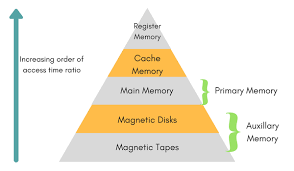
A computer system contains various types of memories like auxiliary memory, cache memory, and main memory.
Auxiliary Memory
The auxiliary memory is at the bottom and is not connected with the CPU directly. However, being slow, it is present in large volume in the system due to its low pricing. This memory is basically used for storing the programs that are not needed in the main memory. This helps in freeing the main memory which can be utilized by other programs that needs main memory. The main function of this memory is to provide parallel searching that can be used for performing a search on an entire word.
1) Main Memory
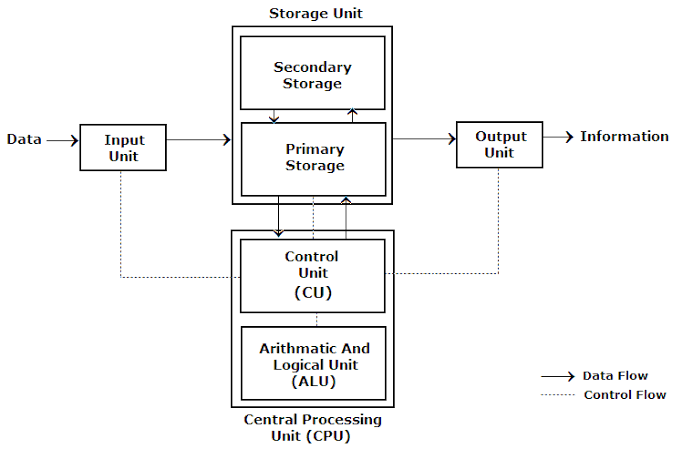
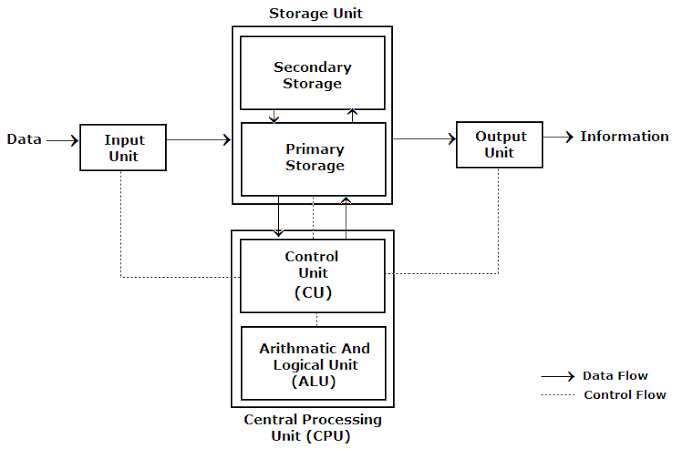
The main memory is at the second level of the hierarchy. Due to its direct connection with the CPU, it is also known as central memory. The main memory holds the data and the programs that are needed by the CPU. The main memory mainly consists of RAM, which is available in static and dynamic mode.
Cache memory is at the top level of the memory hierarchy. This is a high speed memory used to increase the speed of processing by making current programs and data available to the CPU at a rapid rate. Cache memory is usually placed between the CPU and the main memory.
Main Memory
Central storage unit in a computer system.
• Large memory.
• Made up of integrated chips
Types: 1) RAM (Random access memory)
2) ROM (Read only memory)
RAM (Random Access Memory)
Random access memory (RAM) is the best known form of computer memory. RAM is considered “random access” because you can access any memory cell directly if you know the row and column that intersect at that cell.
Types of RAM:-
1)Static RAM (SRAM)
2)Dynamic RAM (DRAM)
Static RAM (SRAM):
A bit of data is stored using the state of a flip-flop. – Retains value indefinitely, as long as it is kept powered. – Mostly uses to create cache memory of CPU. – Faster and more expensive than DRAM.
Dynamic RAM (DRAM):
Each cell stores bit with a capacitor and transistor. – Large storage capacity – Needs to be refreshed frequently. – Used to create main memory. – Slower and cheaper than SRAM.
ROM:
ROM is used for storing programs that are Permanently resident in the computer and for tables of constants that do not change in value once the production of the computer is completed The ROM portion of main memory is needed for storing an initial program called bootstrap loader, witch is to start the computer software operating when power is turned on.
There are five basic ROM types:
1) ROM – Read Only Memory
2) PROM – Programmable Read Only Memory
3) EPROM – Erasable Programmable Read Only Memory
4) EEPROM – Electrically Erasable Programmable Read Only Memory
5) Flash EEPROM memory
 COMPUTERLEARNING